In 'the other place', there's a button at the bottom of the page to make it fill the width of the screen. Is there a way of achieving that here?

You are using an out of date browser. It may not display this or other websites correctly.
You should upgrade or use an alternative browser.
You should upgrade or use an alternative browser.
Any way to make the content fill the browser window?
- Thread starter GarySN
- Start date
That's the window resizing buttons. I'm talking about the amount of the page taken up by the forum content, as opposed to the background, when the window is maximised.Have you tried the top grey bar of the computer/phone that shows and underline, multiple squres and the cancel x in the top right of you screen, press the multiple squares and see if that resolves the issue?


You seem to have a huge one, mine is tiny in comparisonThat's the window resizing buttons. I'm talking about the amount of the page taken up by the forum content, as opposed to the background, when the window is maximised.
View attachment 3923


Rebel
Well-known member
Or press hold the Ctrl and scroll the middle mouse button up/down to preferred size... let go of ' Ctrl button' job doneIf you are on a windows PC, press F11 to fill the screenSame again to get it back down
Why, thank you!You seem to have a huge one, mine is tiny in comparison
All who are telling me how to change the window size to fill the desktop, thanks, but that’s not the problem.
Hopefully the attached photos will illustrate the problem.
Irrespective of the window size, the ‘white bit’ does not fill the width of the page if viewing on a desktop/laptop, in my case using Windows or Mac OSX.
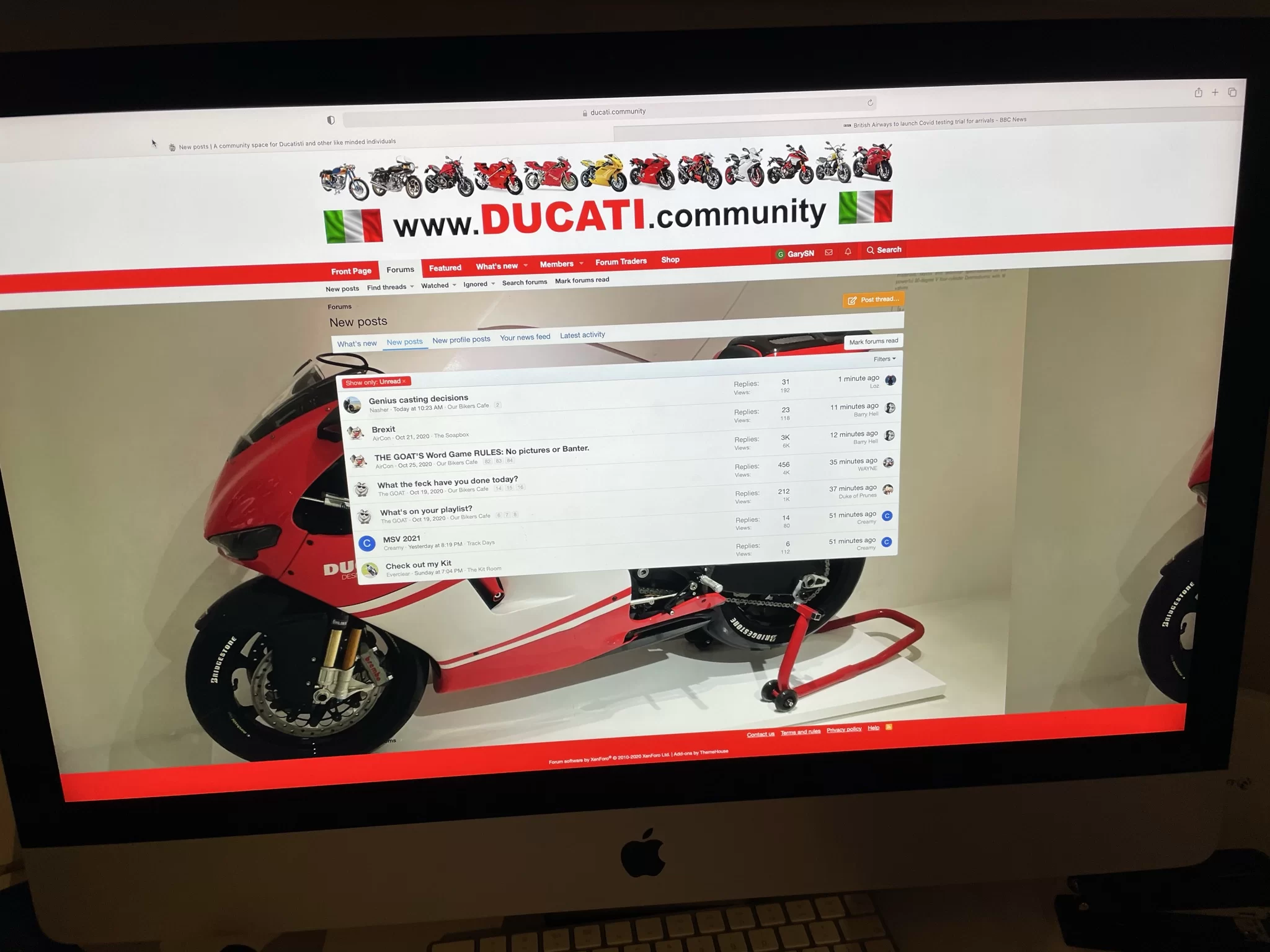
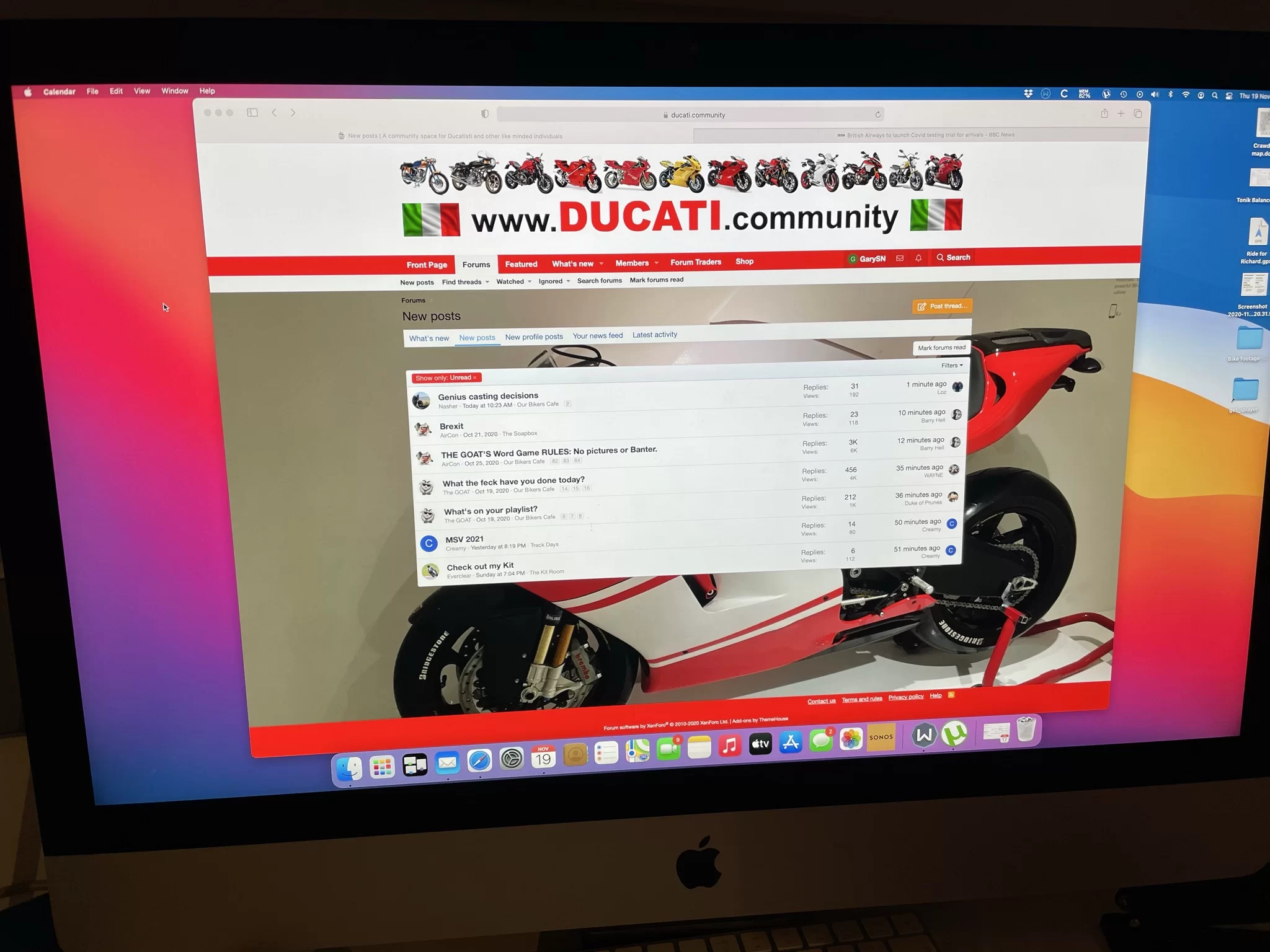

Hopefully the attached photos will illustrate the problem.
Irrespective of the window size, the ‘white bit’ does not fill the width of the page if viewing on a desktop/laptop, in my case using Windows or Mac OSX.

What version of OSX are you running and what browser are you using snd what version of that browser. The pages served up by the server should auto-size to fill the size of the window you have open.All who are telling me how to change the window size to fill the desktop, thanks, but that’s not the problem.
Hopefully the attached photos will illustrate the problem.
Irrespective of the window size, the ‘white bit’ does not fill the width of the page if viewing on a desktop/laptop, in my case using Windows or Mac OSX.

OSX version is 11.0.1. Browser is Safari. My knowledge of web site tech is limited, but the SITE is rendering to the full width of the window, but the FRAME (?) is not. As I said in my OP, the other place has a button to toggle between the two. More pics attached to illustrate. The Safari window is the same size in each pic.
Attachments



I wonder if, the button on df is because they are running xenforo 2010-2017 and dc is running xenforo 2010-2020 and possibly the re-sizing button on df is autosizing on dc so doesn't have the button?
Have you tried clearing the cache and history then tried accessing dc again?
Have you tried clearing the cache and history then tried accessing dc again?
Ok, I can see that’s an iMac with probably a 27” screen and I can see what you mean, the background resizes yo the size of the screen but the frame in the middle which holds the content has resized to its maximum.
Having just checked on a 27” iMac the frame in the middle is 28cm wide, about 11”.
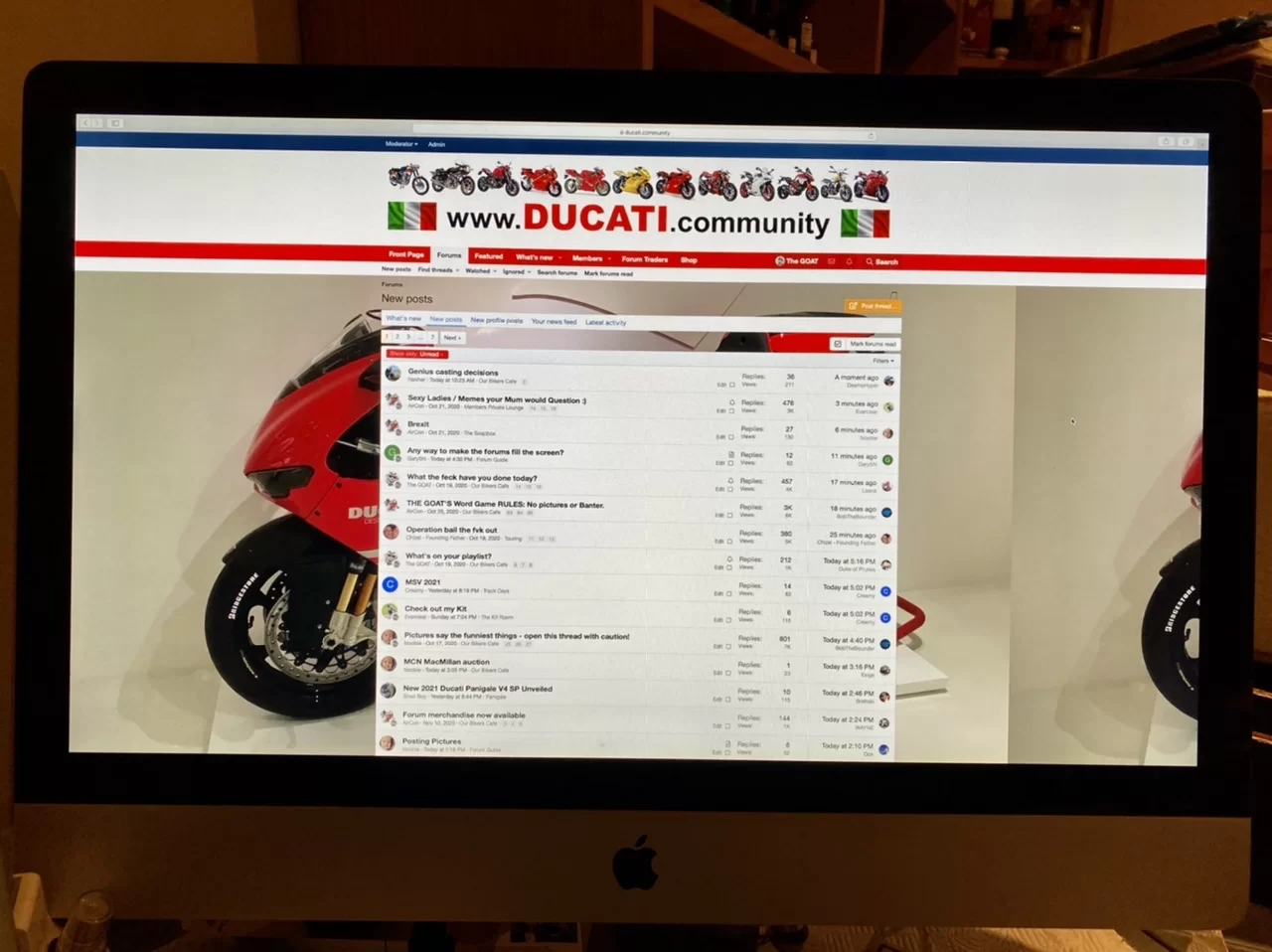
Let me see what, if anything, can be done to make the frame wider if it’s really a problem for people.
Having just checked on a 27” iMac the frame in the middle is 28cm wide, about 11”.
Let me see what, if anything, can be done to make the frame wider if it’s really a problem for people.

Silly question but on a mobile there is an option to ‘request desktop site’, it’s not displaying the mobile site for some reason ?It's like I'm viewing a Mobile site on a desk top.
Oh. Ignore what I said The GOAT is on it.
The mobile version should always display when it’s a mobile device requesting the data from the server.Silly question but on a mobile there is an option to ‘request desktop site’, it’s not displaying the mobile site for some reason ?
Can you please screen shot where you are getting ‘request desktop site’ and also, is that an option you are being given (which is ok and normal) or are you saying you can’t get the mobile version on your mobile, you can only get the desktop version?

The mobile version should always display when it’s a mobile device requesting the data from the server.
Can you please screen shot where you are getting ‘request desktop site’ and also, is that an option you are being given (which is ok and normal) or are you saying you can’t get the mobile version on your mobile, you can only get the desktop version?
I think it’s a safari feature on IPhone.
All working fine for me, I wondered if for some reason on a desktop it had loaded the mobile version.
I got Scotty in the engine room to change the Reverse Parabolic Thrust drive for the Fluxatron Magnometer on the Warp Drive nuclear reactor. Seems to have done the job until we get back to Starbase CommandSorted! Out of curiosity, what did you change?View attachment 3938
 .
.
This is the trade off unfortunately.@The GOAT On chrome, It is now full width, tbh I preferred before as I could see glimpses of the 16rr!
Yep, that’s a normal option in Safari for iOS, you can switch between the two, no need to really, just let the software do its thing.View attachment 3939
I think it’s a safari feature on IPhone.
All working fine for me, I wondered if for some reason on a desktop it had loaded the mobile version.
Okey dokey then chief, I vote for the previous option of seeing the DD

I got Scotty in the engine room to change the Reverse Parabolic Thrust drive for the Fluxatron Magnometer on the Warp Drive nuclear reactor. Seems to have done the job until we get back to Starbase Command
That's what I would have done.
I’m going to have to monitor the situation and if there are more people who raise issues such as you Bob than raise issues about the central frame being too small then I will ask Scotty to undo what he did. The majority will rule on this one as it’s an aesthetic issue not a technical problem.@The GOAT On chrome, It is now full width, tbh I preferred before as I could see glimpses of the 16rr!